CLI
You can use our CLI to deploy your app or you can connect your GitHub.
Tip: You can switch between CLI and GitHub deployment methods at any time from your App Settings page. See Switching Deployment Method for details.
Install
You can install our CLI using curl.
curl -fsSL https://raw.githubusercontent.com/quaveone/cli/main/install.sh | bash
This installs the quaveone binary to ~/.local/bin (or /usr/local/bin if writable).
Note: The installer also creates a
zcloudsymlink pointing to thequaveonebinary, so the legacy command name continues to work.
We recommend that you add the installation directory to your PATH so you can use it from anywhere.
Installer options
The installer supports environment variables for customization:
| Variable | Description | Default |
|---|---|---|
QUAVEONE_VERSION | Specific version to install | Latest |
QUAVEONE_INSTALL_DIR | Custom installation directory | ~/.local/bin or /usr/local/bin |
# Install a specific version
QUAVEONE_VERSION=1.0.28 bash -c "$(curl -fsSL https://raw.githubusercontent.com/quaveone/cli/main/install.sh)"

# Install to a custom directory
QUAVEONE_INSTALL_DIR=./bin bash -c "$(curl -fsSL https://raw.githubusercontent.com/quaveone/cli/main/install.sh)"
Manual download
Download the binary for your platform from the releases page.
| OS | Architecture | File |
|---|---|---|
| Linux | x86_64 | quaveone-{version}-linux-amd64 |
| Linux | ARM64 | quaveone-{version}-linux-arm64 |
| macOS | x86_64 | quaveone-{version}-darwin-amd64 |
| macOS | ARM64 (M1+) | quaveone-{version}-darwin-arm64 |
| Windows | x86_64 | quaveone-{version}-windows-amd64.exe |
| Windows | ARM64 | quaveone-{version}-windows-arm64.exe |
Using Docker
docker run --rm -it --user $(id -u):$(id -g)  \
  -v $PWD:/source quaveone/quaveone-cli \
  deploy --dir /source --user-token USER_TOKEN --env ENV_NAME
Deploying using the CLI
You can deploy your app using the CLI. You need to inform two arguments:
--user-tokenor--env-token: authentication token (if both are informeduser-tokenwill be used)--env: environment name
quaveone deploy --user-token your-token --env your-env
You can get your user token from your user profile page and the env-token for your app env settings page. Or copy the whole command straight from the CLI deployment instruction in the app env page.
What our CLI does is simple: we zip your files in the current folder and send to our storage. Then we download from there and start the build & deploy process exactly as we do for GitHub connected repositories.
Ignore Files
Our CLI specifically supports an ignore file. To utilize this feature, create a .quaveoneignore file in your root
directory. Within this file, you can specify all files and folders that should be ignored during the deployment process.
Note: The legacy
.zcloudignorefilename is still supported for backward compatibility.
By default, if no ignore file is present, certain folders such as .git/, node_modules/, and .meteor/local are
automatically ignored.
We strongly recommend ignoring at least the .git/ folder, as our build process only utilizes current files and will
not navigate within your Git repository.
Git Repository
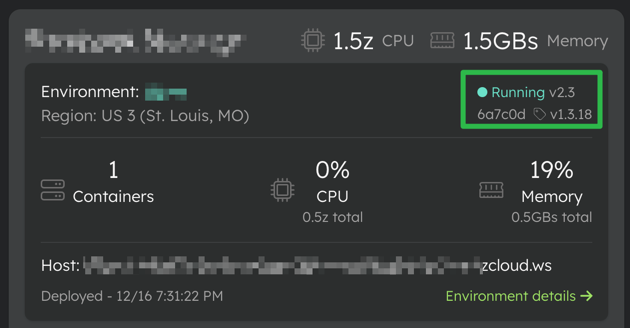
When running our CLI within a Git repository, the current commit hash, current branch, and the tags associated with the specific commit are sent to our servers. This information is then presented along with our version in the Quave Cloud web application.
Authentication
We provide two tokens: user token and env token.
Both are valid to run all commands, the difference is the scope of permissions. The user token is able to do everything this user can do in the web app, while the env token is able to apply changes only to this app environment.
Advanced Options
Arguments
| Flag | Description |
|---|---|
--user-token | User authentication token (use this or --env-token) |
--env-token | Environment authentication token (use this or --user-token) |
--env | Environment name (required) |
--dir | Source directory (default: current directory) |
--image | Container image to deploy (cannot be used with --dir). See Deploy with Image for more details. |
--env-var | Environment variable as NAME=VALUE (repeatable) |
--json-env-file | Path to JSON file with environment variables |
--create | Create a new environment |
--app | App slug (used with --create) |
--zclouds | Resources to apply to the created environment (used with --create) |
--copy-env-vars-from | Copy environment variables from another environment (used with --create) |
--save-only | Save changes without triggering a deployment |
Function app options
These flags configure scaling and timeout settings for function apps (Knative). They are only applied when the app uses
the FUNCTION docker preset.
| Flag | Description |
|---|---|
--fn-container-concurrency | Max concurrent requests per container instance |
--fn-timeout | Request timeout in seconds |
--fn-idle-timeout | Idle timeout before scale-to-zero in seconds (minimum 300) |
--fn-response-start-timeout | Timeout for first byte of response in seconds |
--fn-min-scale | Minimum number of container instances (0 allows scale-to-zero) |
--fn-max-scale | Maximum number of container instances |
Root directory
In Quave Cloud web app you can configure your Root directory in the app Settings tab but keep in mind that if you
use our CLI --dir option this directory is your root for this deployment as Quave Cloud build system is just going to
receive this directory from the CLI upload.
So if you have a docs folder inside your root and you deploy using quaveone deploy --dir docs your app should be
configured to consider docs as the root. For example, your Root directory should be ./ and if your Dockerfile is
inside <your root dir>/docs/Dockerfile in your Dockerfile Path field you should set Dockerfile as the build system
only sees the docs folder.
CLI Usage Examples
Default
quaveone deploy --user-token <token> --env <env name>
With one env var
quaveone deploy --user-token <token> --env <env name> --env-var ENVIRONMENT=production
With multiple env vars
quaveone deploy --user-token <token> --env <env name> --env-var ENVIRONMENT=production --env-var ROOT_URL=https://example.com
Env var content from file
quaveone deploy --user-token <token> --env <env name> --env-var METEOR_SETTINGS="$(cat settings-cli.json)"
Env vars from JSON file
quaveone deploy --user-token <token> --env <env name> --json-env-file ./env-vars.json
The JSON file format is:
[
  {
    "name": "VAR_NAME",
    "value": "value",
    "type": "DEPLOY",
    "isSecret": false
  },
  {
    "name": "SECRET_KEY",
    "value": "secret",
    "type": "BOTH",
    "isSecret": true
  }
]
The type field accepts DEPLOY, BUILD, or BOTH (default: DEPLOY).
Deploy with Docker Image
For apps configured to use image deployment (build step is skipped):
quaveone deploy --user-token <token> --env <env name> --image myregistry/myapp:latest
Note: The provided image should be built for the architecture
linux/amd64to run on our platform. For more details on image deployment, see Deploy with Image.
Deploy with Image and Environment Variables
quaveone deploy --user-token <token> --env <env name> --image myregistry/myapp:v1.2.3 --env-var ENVIRONMENT=production
Deploy a function app with scaling configuration
quaveone deploy --user-token <token> --env <env name> \
  --fn-timeout 300 --fn-min-scale 0 --fn-max-scale 5
Deploying using Helm
You can deploy your app using Helm charts with the optional arguments. This strategy provides a Helm-based deployment solution for more customization.
quaveone deploy-helm --chart <path to chart> --values <path to values>/values.yaml --user-token <token> --env <env name>
Arguments for Helm Deployment
| Flag | Description |
|---|---|
--chart | Path to your Helm chart (required) |
--values | Path to your Helm values file (optional) |
--user-token | User authentication token (use this or --env-token) |
--env-token | Environment authentication token (use this or --user-token) |
--env | Environment name (required) |
With Helm deployment, you manage your Helm charts and values for extended control over your app deployment.
For information on what is processed during the Helm deployment, please refer to Helm Parse Information.
CLI Environment variables
All CLI flags can be replaced by environment variables:
| Variable | Description |
|---|---|
QUAVEONE_USER_TOKEN | User authentication token |
QUAVEONE_ENV_TOKEN | Environment authentication token |
QUAVEONE_ENV_NAME | Environment name |
QUAVEONE_SRC_DIR | Source directory |
QUAVEONE_IMAGE | Container image to deploy |
QUAVEONE_APP_SLUG | App slug |
QUAVEONE_COPY_ENV_VARS_FROM | Environment to copy variables from |
QUAVEONE_TEMP_DIR | Temporary directory (default: OS temp dir) |
QUAVEONE_API_CLI_URI | API base URL — only for clients using Quave One Connect |
Note: The legacy
ZCLOUD_prefixed variables (e.g.ZCLOUD_USER_TOKEN,ZCLOUD_ENV_NAME) are still supported for backward compatibility.
Internal environment variables
| Variable | Description |
|---|---|
QUAVEONE_DEBUG | Enable debug messages |