CLI
You can use our CLI to deploy your app or you can connect your GitHub.
Tip: You can switch between CLI and GitHub deployment methods at any time from the App's App Config section. See Switching Deployment Method for details.
Install
You can install our CLI using curl.
curl -fsSL https://raw.githubusercontent.com/quaveone/cli/main/install.sh | bash
This installs the latest stable quaveone binary from the Quave ONE CLI releases to ~/.local/bin (or /usr/local/bin if writable).
Note: The installer also creates a
zcloudsymlink pointing to thequaveonebinary, so the legacy command name continues to work.
We recommend that you add the installation directory to your PATH so you can use it from anywhere.
Installer options
The installer supports environment variables for customization:
| Variable | Description | Default |
|---|---|---|
QUAVEONE_VERSION | Optional version to install when you intentionally need to pin or test a release | Latest stable GitHub release |
QUAVEONE_INSTALL_DIR | Custom installation directory | ~/.local/bin or /usr/local/bin |
# Optional: pin a version only when you need to reproduce or roll back
QUAVEONE_VERSION="<version>" bash -c "$(curl -fsSL https://raw.githubusercontent.com/quaveone/cli/main/install.sh)"

# Install to a custom directory
QUAVEONE_INSTALL_DIR=./bin bash -c "$(curl -fsSL https://raw.githubusercontent.com/quaveone/cli/main/install.sh)"
Manual download
Download the binary for your platform from the releases page.
| OS | Architecture | File |
|---|---|---|
| Linux | x86_64 | quaveone-{version}-linux-amd64 |
| Linux | ARM64 | quaveone-{version}-linux-arm64 |
| macOS | x86_64 | quaveone-{version}-darwin-amd64 |
| macOS | ARM64 (M1+) | quaveone-{version}-darwin-arm64 |
| Windows | x86_64 | quaveone-{version}-windows-amd64.exe |
| Windows | ARM64 | quaveone-{version}-windows-arm64.exe |
Using Docker
docker run --rm -it --user $(id -u):$(id -g)  \
  -v $PWD:/source quaveone/quaveone-cli:latest \
  deploy --dir /source --user-token USER_TOKEN --env ENV_NAME
Deploying using the CLI
You can deploy your app using the CLI. You need to inform two arguments:
--user-tokenor--env-token: authentication token (if both are informeduser-tokenwill be used)--env: environment name
quaveone deploy --user-token your-token --env your-env
You can get your user token from your user profile page and the env-token from Environment Settings → Authentication. Or copy the whole command straight from the CLI deployment instruction in the app env page.
What our CLI does is simple: we zip your files in the current folder and send to our storage. Then we download from there and start the build & deploy process exactly as we do for GitHub connected repositories.
Ignore Files
Our CLI specifically supports an ignore file. To utilize this feature, create a .quaveoneignore file in your root
directory. Within this file, you can specify all files and folders that should be ignored during the deployment process.
Note: The legacy
.zcloudignorefilename is still supported for backward compatibility.
By default, if no ignore file is present, certain folders such as .git/, node_modules/, and .meteor/local are
automatically ignored.
We strongly recommend ignoring at least the .git/ folder, as our build process only utilizes current files and will
not navigate within your Git repository.
Git Repository
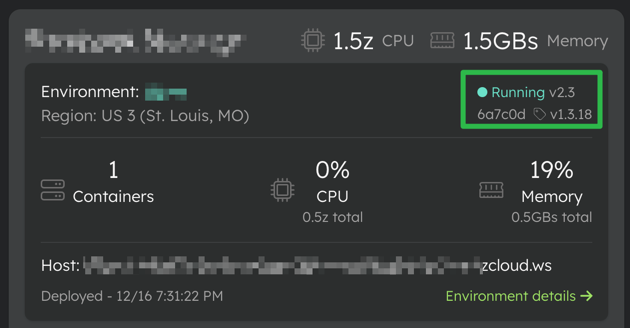
When running our CLI within a Git repository, the current commit hash, current branch, and the tags associated with the specific commit are sent to our servers. This information is then presented along with our version in the Quave ONE web application.
Authentication
Quave ONE supports two token types:
- A user token can do what that user can do in the web app. Use it for interactive CLI workflows, account/app/env discovery, branch previews, and user-scoped operations.
- An env token is scoped to one app environment. Use it for CI deploy/status operations that do not need broader account access.
For interactive use, connect once and store a local CLI token:
quaveone login --user-token your-user-token
quaveone whoami
quaveone logout
login stores the token in a local Quave ONE CLI config file with restrictive file permissions. CLI output never prints the token. logout clears the connected user and the CLI current account.
Authentication precedence is:
- command flags such as
--user-tokenor--env-token; - environment variables such as
QUAVEONE_USER_TOKENorQUAVEONE_ENV_TOKEN; - the token saved by
quaveone login.
GitHub Actions and other CI systems should keep using explicit flags or environment variables. They do not depend on local CLI config.
CLI current account and discovery
The CLI current account is local CLI state only. It is separate from the current account selected in the Quave ONE dashboard and does not mutate the dashboard/UI current-account setting.
quaveone account list
quaveone account set acme
quaveone account current
quaveone account unset

quaveone app list
quaveone env list --app web
quaveone env status --env web-prod
account set accepts an account slug, name, or account ID. app list and env list default to the CLI current account; pass --account to override it for one command. env status works with either a user token or an env token and shows the current deployment state without triggering a new deploy.
Use --output json on list, status, create, and run commands when automation needs machine-readable output.
Scale and prevent-destroy checks
quaveone scale --env web-prod --containers 2 --wait
quaveone env prevent-destroy enable --env web-prod
quaveone env prevent-destroy disable --env web-prod
quaveone env prevent-destroy status --env web-prod --output json
scale prints the current environment status when available. Add --wait to poll until the scale operation reaches a terminal state. Prevent-destroy changes require a user token; a local login is enough for interactive use.
Advanced Options
Arguments
| Flag | Description |
|---|---|
--user-token | User authentication token (use this or --env-token) |
--env-token | Environment authentication token (use this or --user-token) |
--env | Environment name (required) |
--dir | Source directory (default: current directory) |
--image | Container image to deploy (cannot be used with --dir). See Deploy with Image for more details. |
--env-var | Environment variable as NAME=VALUE (repeatable) |
--json-env-file | Path to JSON file with environment variables |
--command | Persistent startup command for this environment. Defaults to shell mode. |
--arg | Exact startup argument (repeatable). Can be used without --command to preserve the image entrypoint. |
--shell | Run --command through /bin/sh -lc. Default: true; use --shell=false for an exact executable. |
--working-dir | Persistent working directory override inside the container. |
--replace-startup-config | Treat the supplied startup flags as the complete override and remove previously saved fields that were omitted. Requires at least one startup value. |
--clear-command | Clear all saved startup overrides and restore the image defaults. Cannot be combined with other startup flags. |
--create | Create a new environment |
--app | App slug (used with --create) |
--zclouds | Resources to apply to the created environment (used with --create) |
--copy-env-vars-from | Copy only environment variables from another environment (used with --create). This does not clone resources, security settings, startup settings, or cleanup TTL. |
--save-only | Save changes without triggering a deployment |
--wait | Wait for the triggered deployment to finish and exit non-zero when it fails or times out |
--wait-timeout-seconds | Maximum seconds to wait for deployment completion. Default: 1800 seconds. |
--poll-interval-seconds | Seconds between deployment status polls. Default: 5 seconds. |
Function app options
These flags configure scaling and timeout settings for function apps (Knative). They are only applied when the app uses
the FUNCTION docker preset.
| Flag | Description |
|---|---|
--fn-container-concurrency | Max concurrent requests per container instance |
--fn-timeout | Request timeout in seconds |
--fn-idle-timeout | Idle timeout before scale-to-zero in seconds (minimum 300) |
--fn-response-start-timeout | Timeout for first byte of response in seconds |
--fn-min-scale | Minimum number of container instances (0 allows scale-to-zero) |
--fn-max-scale | Maximum number of container instances |
Branch previews
Branch previews create temporary environments from an existing source environment. Use preview deploy when source code must be uploaded and deployed in the same command; it creates or reuses the branch preview first, then deploys the selected source directory. Use preview create alone when you only need to provision or inspect the preview before a separate deployment.
quaveone preview create --app <app-slug> --from <source-env> --branch <branch> --ttl-hours <hours> [--idle-hours <hours>] [--prevent-destroy] [--wait]
quaveone preview deploy --app <app-slug> --from <source-env> --branch <branch> --ttl-hours <hours> [--idle-hours <hours>] [--dir <source-dir>] [--prevent-destroy] [--wait]
quaveone preview list --app <app-slug>
quaveone preview show --env <preview-cli-env-name>
quaveone preview extend --env <preview-cli-env-name> --additional-ttl-hours <hours>
quaveone preview delete --env <preview-cli-env-name>
quaveone env prevent-destroy status --env <cli-env-name>
quaveone env prevent-destroy enable --env <cli-env-name>
quaveone env prevent-destroy disable --env <cli-env-name>
preview create and preview deploy resolve --app to the app ID and resolve --from as an exact app environment ID, exact CLI environment name, or exact display environment name scoped to that app. The preview copies preview-safe runtime settings from the source environment, including environment variables, resources, startup config, Function config, Job config, WAF/rate-limit settings, IP allowlist settings, and autoscaling settings. It does not copy custom domains, notification destinations, deployment history, one-off credentials, source preview metadata, or the source environment's Prevent destroy setting. preview create returns the preview identity and a follow-up deploy command. preview deploy is the single-command alternative for a local/CI source deployment and accepts --dir for monorepos. Branch previews are not supported for Databases & Services environments. Existing deploy --create --copy-env-vars-from remains env-var-only and does not clone resources, startup settings, preview metadata, or cleanup TTL.
Every preview must have an absolute TTL with --ttl-hours; Quave ONE caps it at 168 hours. Add --idle-hours when idle previews should be removed earlier after a full idle window with no ingress traffic. preview create, preview deploy, preview list, and preview show include the preview URL and hosts/domains in text output and JSON output. preview show also includes branch, expiration, cleanup/protection state, and current deployment status when available. preview extend adds time to the expiration, updates QUAVEONE_PREVIEW_EXPIRES_AT, and records an audit event. preview delete only deletes environments that were created as branch previews. If Prevent destroy is enabled on the preview, disable it before deleting the preview.
Root directory
In the Quave ONE web app, configure Root directory under App Config, but keep in mind that if you
use our CLI --dir option this directory is your root for this deployment as Quave ONE build system is just going to
receive this directory from the CLI upload.
So if you have a docs folder inside your root and you deploy using quaveone deploy --dir docs your app should be
configured to consider docs as the root. For example, your Root directory should be ./ and if your Dockerfile is
inside <your root dir>/docs/Dockerfile in your Dockerfile Path field you should set Dockerfile as the build system
only sees the docs folder.
CLI Usage Examples
Default
quaveone deploy --user-token <token> --env <env name>
With one env var
quaveone deploy --user-token <token> --env <env name> --env-var ENVIRONMENT=production
With multiple env vars
quaveone deploy --user-token <token> --env <env name> --env-var ENVIRONMENT=production --env-var ROOT_URL=https://example.com
Env var content from file
quaveone deploy --user-token <token> --env <env name> --env-var METEOR_SETTINGS="$(cat settings-cli.json)"
Env vars from JSON file
quaveone deploy --user-token <token> --env <env name> --json-env-file ./env-vars.json
The JSON file format is:
[
  {
    "name": "VAR_NAME",
    "value": "value",
    "type": "DEPLOY",
    "isSecret": false
  },
  {
    "name": "SECRET_KEY",
    "value": "secret",
    "type": "BOTH",
    "isSecret": true
  }
]
The type field accepts DEPLOY, BUILD, or BOTH (default: DEPLOY).
The isSecret field defaults to true for new variables. Existing variables keep their current isSecret setting unless explicitly overridden.
Deploy with Docker Image
For apps configured to use image deployment (build step is skipped):
quaveone deploy --user-token <token> --env <env name> --image myregistry/myapp:latest
Note: The provided image should be built for the architecture
linux/amd64to run on our platform. For more details on image deployment, see Deploy with Image.
Deploy with Image and Environment Variables
quaveone deploy --user-token <token> --env <env name> --image myregistry/myapp:v1.2.3 --env-var ENVIRONMENT=production
Override the Startup Command
Use the same image for an API and a worker by saving a different startup command on the worker environment:
quaveone deploy \
  --user-token <token> \
  --env <worker env name> \
  --image myregistry/myapp:v1.2.3 \
  --command "bun run start:worker" \
  --wait
--command uses shell mode by default. For a distroless image or exact
argument boundaries, use direct mode:
quaveone deploy \
  --user-token <token> \
  --env <worker env name> \
  --image myregistry/myapp:v1.2.3 \
  --command bun \
  --shell=false \
  --arg run \
  --arg start:worker
The configuration is saved on the app environment. Omitted startup fields keep
their current values by default. Add --replace-startup-config when the flags
describe the complete desired override and previously saved omitted fields must
be removed. This is useful for switching from a command override to a true
args-only override. --clear-command removes the command, arguments, shell mode,
and working directory together.
The same flags work with --dir source deployments, and changing startup
configuration does not change the build hash. See
Startup Command Overrides for args-only,
working-directory, reset, API, and MCP examples.
Use --wait to Wait for a Deploy to Finish
Add --wait when your CI pipeline should fail if the Quave ONE deploy fails instead of only triggering the deploy.
It works for both source-code deploys and image deploys.
quaveone deploy \
  --user-token <token> \
  --env <env name> \
  --image myregistry/myapp:v1.2.3 \
  --wait
Optional wait flags:
| Flag | Description |
|---|---|
--wait-timeout-seconds | Maximum time to wait for the deploy result. Default: 1800 seconds. |
--poll-interval-seconds | Status polling interval. Default: 5 seconds. |
--wait exits with code 0 only when the target deployment succeeds. It exits non-zero when the deploy fails or the wait times out. For image deploys, Quave ONE waits for the content version returned by the deploy request. For source-code deploys, Quave ONE waits for the deployment started after the upload. Do not combine --wait with --save-only, because --save-only does not trigger a deployment to wait for.
Running Job apps from the CLI
Use quaveone job run for finite workloads such as Rails migrations and backfills. Use the Rails command that exists inside your container, usually bin/rails db:migrate for apps with Rails binstubs or bundle exec rails db:migrate.
quaveone job run \
  --user-token <token> \
  --env <job env name> \
  --image myregistry/myapp:v1.2.3 \
  --env-var RAILS_ENV=production \
  --env-var DATABASE_URL="$DATABASE_URL" \
  --command "bin/rails db:migrate" \
  --wait \
  --logs-on-failure
Important flags:
| Flag | Description |
|---|---|
--image | Registers this image on the Job environment before creating the JobRun. Use the same tag that the app deploy will use. |
--content-id | Run an existing content/image version instead of registering a new image. |
--env-var | Merge an environment variable as NAME=VALUE before running. Repeat for multiple variables. |
--command | Per-run command override, such as bin/rails db:migrate. |
--arg | Per-run command argument. Repeat for multiple arguments. |
--working-dir | Working directory inside the container. |
--shell | Run the command through /bin/sh -lc. Default: true. |
--timeout-seconds | Active deadline for this JobRun. |
--ttl-seconds-after-finished | Kubernetes TTL after the JobRun finishes. |
--backoff-limit | Kubernetes Job retry backoff. Use 0 for migrations that should not auto-retry. |
--wait | Poll the JobRun until it reaches a terminal status. |
--wait-timeout-seconds | Maximum seconds to wait for JobRun completion. Default: 1800 seconds. |
--poll-interval-seconds | Seconds between JobRun status polls. Default: 5 seconds. |
--logs-on-failure | Print JobRun logs when the terminal status is not SUCCEEDED. |
--output | Output format: text or json. |
Follow up on JobRuns without adding a general log surface:
quaveone job list --env <job env name> --limit 20 --output json
quaveone job status --env <job env name> --run <job run id>
There is no new quaveone job logs command. The existing job run --logs-on-failure flag remains available for failed runs.
Job --env-var values are merged into the saved Job environment after the run passes validation and reserves its concurrency slot. Existing variables not passed remain unchanged. Plain NAME=VALUE input keeps an existing variable's secret/type settings, while structured JSON can explicitly change them; new plain variables default to secret runtime variables. The configuration merge is durable even if a later enqueue step fails, and the values remain available to future JobRuns until changed. Quave ONE also stores a runtime variable snapshot on the new JobRun, with secret values encrypted, so later environment edits cannot change the variables used by that run. BUILD-only variables are saved but excluded from Job containers; use DEPLOY or BOTH for runtime values. This works with either --image, --content-id, or the environment's current content.
For explicit metadata, pass the same structured JSON form supported by deploys:
quaveone job run \
  --env <job env name> \
  --env-var '{"name":"PUBLIC_MODE","value":"migration","type":"BOTH","isSecret":false}' \
  --command "bin/rails db:migrate" \
  --wait
Run a Job, then Deploy with --wait
Use this pattern when your pipeline needs to execute a Job, wait for it, and then execute the app deploy. Keep the Job and app deploy as separate ordered CI steps. The deploy command should run only after quaveone job run --wait exits successfully:
In short: execute job with --wait; if it succeeds, execute deploy with --wait.
IMAGE="myregistry/myapp:${GITHUB_SHA}"

quaveone job run \
  --user-token <token> \
  --env acme-rails-migration-prod \
  --image "$IMAGE" \
  --env-var RAILS_ENV=production \
  --env-var DATABASE_URL="$DATABASE_URL" \
  --command "bin/rails db:migrate" \
  --wait \
  --timeout-seconds 1800 \
  --backoff-limit 0 \
  --logs-on-failure

quaveone deploy \
  --user-token <token> \
  --env acme-rails-web-prod \
  --image "$IMAGE" \
  --wait
The second command runs only if the migration command exits successfully.
Deploy a function app with scaling configuration
quaveone deploy --user-token <token> --env <env name> \
  --fn-timeout 300 --fn-min-scale 0 --fn-max-scale 5
CLI Environment variables
These common CLI inputs can be replaced by environment variables:
| Variable | Description |
|---|---|
QUAVEONE_USER_TOKEN | User authentication token |
QUAVEONE_ENV_TOKEN | Environment authentication token |
QUAVEONE_ENV_NAME | Environment name |
QUAVEONE_SRC_DIR | Source directory |
QUAVEONE_IMAGE | Container image to deploy |
QUAVEONE_APP_SLUG | App slug |
QUAVEONE_COPY_ENV_VARS_FROM | Environment to copy variables from |
QUAVEONE_TEMP_DIR | Temporary directory (default: OS temp dir) |
QUAVEONE_CONFIG_FILE | Optional local CLI config file path override |
QUAVEONE_API_CLI_URI | API base URL — only for clients using Quave One Connect |
Note: The legacy
ZCLOUD_prefixed variables (e.g.ZCLOUD_USER_TOKEN,ZCLOUD_ENV_NAME) are still supported for backward compatibility.Wait controls such as
--wait,--wait-timeout-seconds, and--poll-interval-secondsare command flags. Pass them explicitly in CI, or through your deploy action's extra CLI arguments.
Internal environment variables
| Variable | Description |
|---|---|
QUAVEONE_DEBUG | Enable debug messages |